FOR ANALYTICS, BI & REVOPS

Get answers you can explain and trust

Typedef gives analytics and BI teams reconciled metrics, traceable agent answers, and the right data, fast, across every system in the stack.

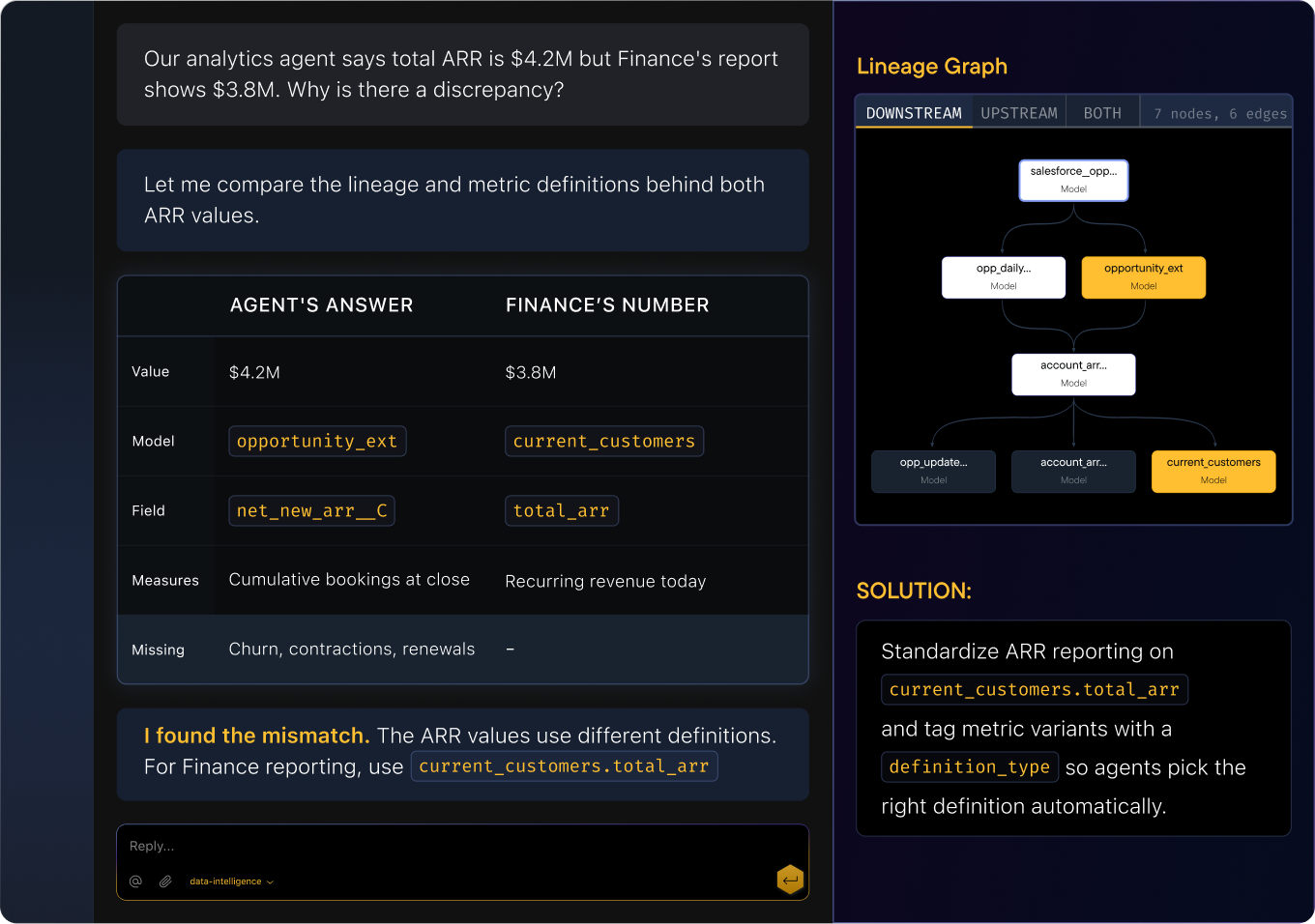
Our analytics agent says total ARR is $4.2M but Finance's report shows $3.8M. Why is there a discrepancy?

The agent and Finance are using different ARR definitions from the same Salesforce source.

Agent's answerFinance's number
Value$4.2M$3.8M
Modelint_opportunity_extrpt_current_customers
Fieldnet_new_arr__ctotal_arr
MeasuresCumulative bookings at closeRecurring revenue today
MissingChurn, contractions, renewals
Fix: use rpt_current_customers.total_arr for ARR reporting and tag columns with a definition_type so agents pick the right one.
ARR lineage (both paths)

Agents answer confidently. They’re often wrong.

Your analytics agent picks a semantic view, runs a query, and returns a number. But it doesn’t know which definition applies, what grain the data is at, or whether the source is stale. Typedef gives agents a live context layer so every answer is explainable and traceable.

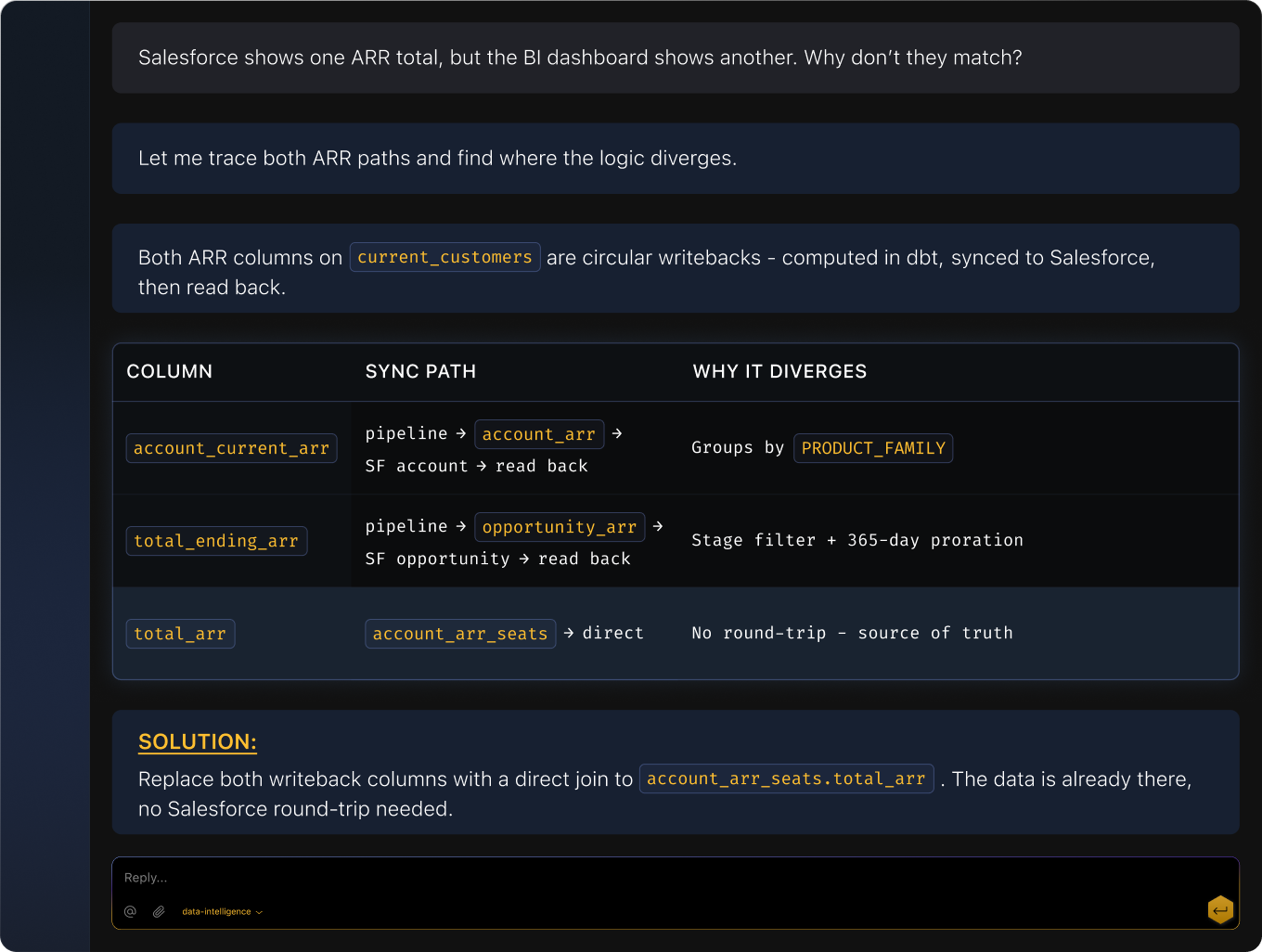
Our analytics agent says total ARR is $4.2M but Finance's report shows $3.8M. Why is there a discrepancy?

Both ARR columns on rpt_current_customers are circular writebacks — computed in dbt, synced to Salesforce, then read back.

ColumnSync pathWhy it diverges
account_current_arrpipeline → sync_account_arr_and_type → SF account → read backGroups by PRODUCT_FAMILY
total_ending_arrpipeline → sync_opportunity_update_ending_arr → SF opportunity → read backStage filter + 365-day proration
total_arrint_account_arr_seats → directNo round-trip — source of truth
Fix: replace both writeback columns with a direct join to int_account_arr_seats.total_arr — the data is already there, no Salesforce round-trip needed.
ARR writeback lineage

The numbers never match

Salesforce says one thing, your BI dashboard says another. The definitions look the same but the logic diverges three joins deep. Typedef traces both paths and surfaces the exact divergence point so you fix the root cause instead of re‑running queries.

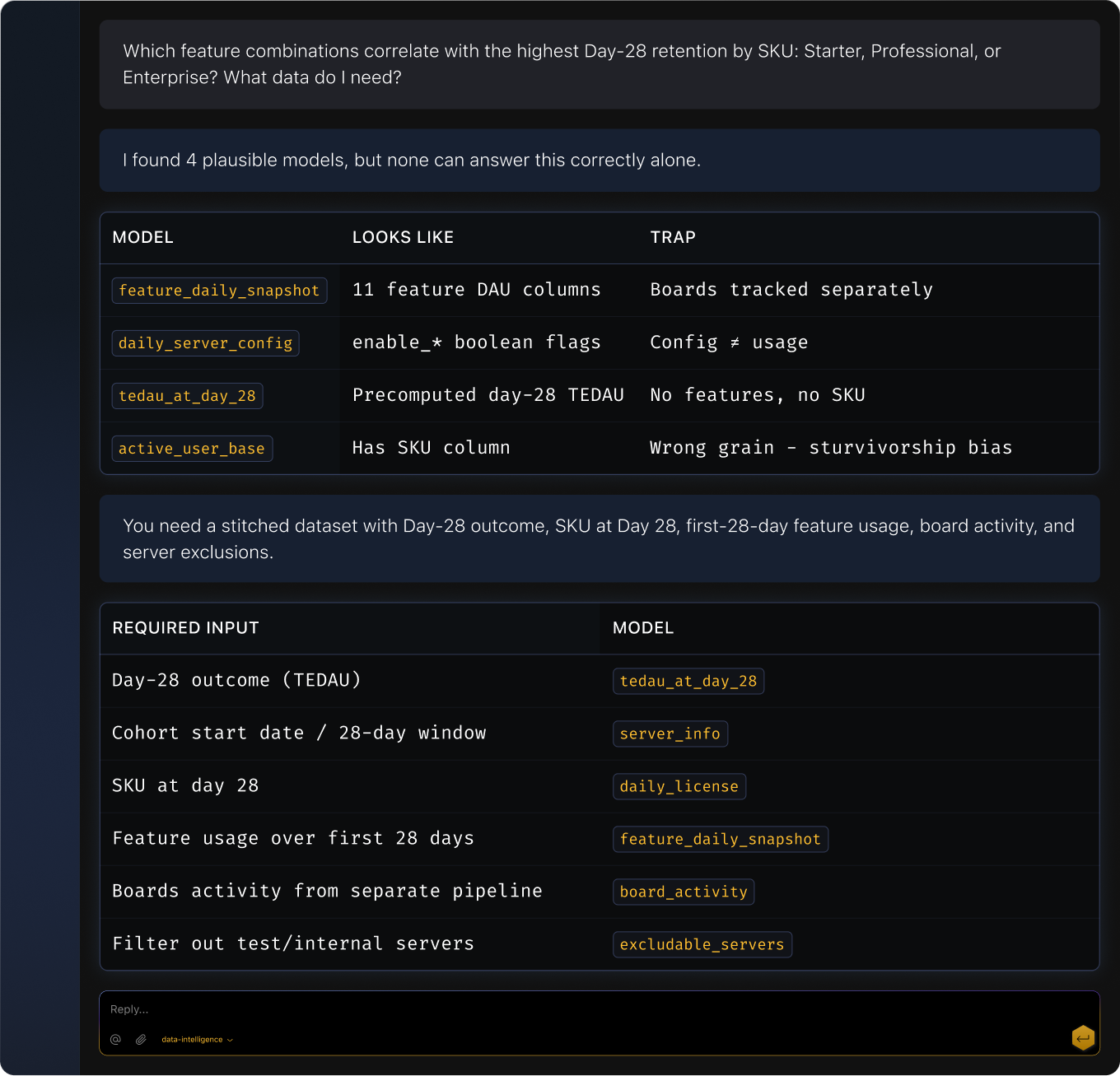
Which feature combinations correlate with the highest Day-28 retention by license tier? I need this by SKU: Starter vs Professional vs Enterprise. What data do I need?

I found 4 candidate models, but each has a hidden problem.

ModelLooks likeTrap
fct_feature_daily_snapshot11 feature DAU columnsBoards tracked separately
dim_daily_server_configenable_* boolean flagsConfig ≠ Usage
rpt_tedau_at_day_28Pre-computed day-28 TEDAUNo features, no SKU
rpt_active_user_baseHas SKU columnWrong grain — survivorship bias

None work alone. The correct answer is a 6-model join:

#ModelRoleJoin key
1rpt_tedau_at_day_28Day-28 outcome (TEDAU)server_id
2dim_server_infofirst_activity_date for 28-day windowserver_id
3dim_daily_licenseSKU at day 28server_id + license_date
4fct_feature_daily_snapshot11 features over first 28 daysserver_id + activity_date
5fct_board_activityBoards usage (separate pipeline)server_id + activity_date
6dim_excludable_serversFilter out test/internal serversserver_id
Feature × TEDAU assembly

Finding the right data takes longer than the analysis

You need churn by segment but there are four models that could work. Typedef surfaces the right model, join path, and query scaffold with freshness, grain, and definition context so you ship accurate results instead of guessing.

How it plays out

Agent Tracing

Agentic Analytics Reliability

Case A: Wrong Answer → Root Cause

Scenario

An analytics agent produces a surprising result.

TYPEDEF ACTIONS

Traces the answer through semantic definitions, models, and sources

Identifies the mismatch: stale data, wrong definition, or upstream change

Surfaces the root cause with the evidence chain

Output

Decision log sidebarInline chips: definition, grain, freshness, source
Case B: Ambiguous Answer → Correct Semantic View

Scenario

Multiple semantic views can answer the same question.

TYPEDEF ACTIONS

Evaluates candidate views by domain, grain, and metric definition

Routes the agent to the correct cube/view/explore at runtime

Logs the resolution reasoning for audit

Output

Reroute to alternate semantic viewResolution log
Reconciliation

Cross-System Reconciliation (Salesforce ↔ BI)

Scenario

Salesforce numbers and BI dashboards disagree.

TYPEDEF ACTIONS

Traces both metric paths: from Salesforce through to the BI layer, and from the warehouse through to the same dashboard

Identifies where the logic or data diverges (different filter, stale snapshot, mismatched join)

Surfaces the divergence point with a side‑by‑side comparison

Recommends which definition to align on based on downstream consumer count

Output

Dual-path lineage viewDivergence highlightDefinition comparison panel
Discovery

Find the Right Data Fast

Scenario

A BI analyst needs churn by segment.

TYPEDEF ACTIONS

Searches the semantic catalog for models matching “churn” + “segment”

Ranks results by relevance, freshness, and usage

Surfaces the recommended model with its join path and query scaffold

Shows definition context: how churn is calculated, what “segment” means, data freshness

Output

Semantic searchModel card with definition + freshness + grainQuery scaffold with pre-filled joins

Make every analytics answer explainable.